
Day to dusk retouching helps real estate listings stand out. It can highlight a property’s exterior design and improve its visual appeal. It also offers an alternative to scheduling a separate sunset photo shoot.
However, a realistic result requires careful editing. The sky, lighting, shadows, and colors must work together. This guide explains the essential steps for creating professional day to dusk images.
What Is Day to Dusk Retouching?
Day to dusk retouching is a photo editing technique that changes a daytime exterior image to look as if it was captured around sunset or twilight.
Editors usually replace the daytime sky with a dusk sky. They adjust the exposure and color of the property. They also add realistic window glow and exterior lighting effects. Twilight images rely on the contrast between a cooler blue sky and warm interior lights.
The goal is to create an inviting image while keeping the property realistic.
1. Choose the Right Daytime Photo
The source image determines the quality of the final result. Choose a clear and well-exposed photo. Make sure the property is easy to see.
A good source image has these features:
-
A clearly visible building facade.
-
Correct exposure on the house.
-
Minimal harsh sunlight and shadows.
-
Clean rooflines and architectural details.
-
A straight and balanced composition.
An overcast sky can be a good starting point. It is often easier to replace than a sky with complex clouds.
Avoid images with severe exposure problems. These can make realistic editing much harder.
2. Replace the Sky

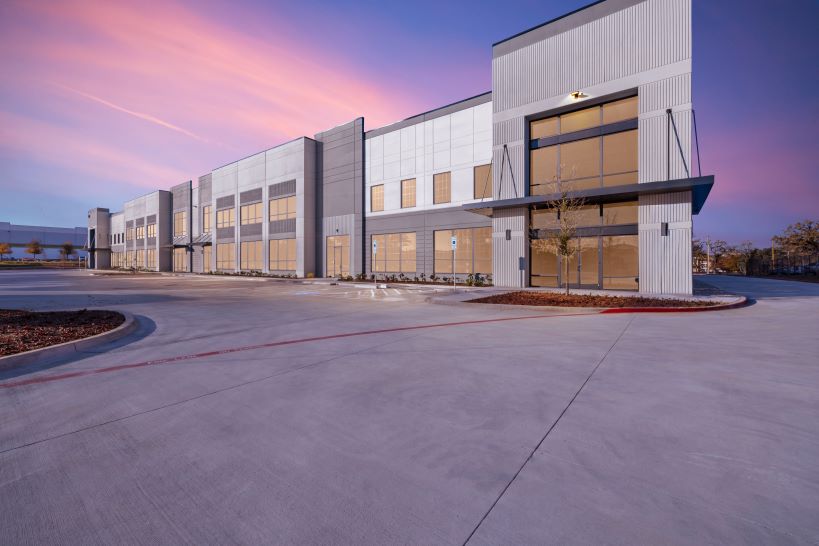
First, select the original sky. Use a selection tool or a layer mask in Photoshop. Then place a suitable twilight sky behind the property.
Choose a sky with natural blue, purple, or soft orange tones. Avoid overly bright colors.
Follow these guidelines:
-
Match the sky to the scene’s lighting.
-
Keep rooflines and tree edges clean.
-
Blend the horizon naturally.
-
Avoid visible halos around buildings.
-
Preserve fine details such as branches and railings.
The new sky should look like part of the original photograph. It should not look pasted onto the image.
3. Adjust the Exterior Lighting
A bright daytime facade may look unnatural beneath a dark twilight sky. Adjust the exterior lighting to match the new atmosphere.
Reduce the exposure slightly where necessary. Adjust the highlights and shadows. Keep important architectural details visible.
Pay attention to these areas:
-
Walls and roof surfaces.
-
Driveways and pathways.
-
Lawns and garden beds.
-
Trees and surrounding structures.
Use separate masks for different parts of the image. This gives you better control over each area.
Do not make the entire property too dark. Buyers should still be able to see the building clearly.
4. Add Realistic Window Glow
Warm windows are a defining feature of twilight photography. They make a property look welcoming.
Start by selecting individual window panes. Add a soft amber or warm white color. Adjust the opacity to keep the effect natural.
Then apply a subtle blur. This softens the light and reduces harsh edges.
For a more realistic result:
-
Vary the brightness between windows.
-
Keep window frames visible.
-
Preserve natural glass reflections.
-
Add subtle light spill where appropriate.
-
Avoid flat, solid yellow window fills.
Some windows may appear brighter than others. This creates a more believable scene.
The light should feel as though it comes from inside the house. It should not look like a colored overlay.
5. Enhance Exterior Lights
Exterior lights add depth to day to dusk images. They also help highlight the property’s design.
Enhance existing porch lights, pathway lights, and garage lights. Add simulated light only when it is appropriate for the scene.
Use a soft, warm glow. Keep the brightest area close to the light source.
Light should fade gradually across nearby surfaces. Avoid large, bright circles around lamps.
Check the direction of the light. It should match the fixture and surrounding surfaces.
Keep the effect subtle. The house should remain the main focus.
6. Correct Colors and Shadows
Color grading helps unite all parts of the image. It makes the sky, building, and landscaping look like they belong in the same scene.
Use cooler tones in the sky. Keep interior lights warm. Adjust the facade and surrounding areas to create a natural balance.
Daytime shadows also need attention. Strong, hard-edged shadows may look out of place in a twilight scene.
Soften or reduce them where necessary. Preserve realistic depth and surface details.
Avoid excessive saturation. Strong orange skies and unnaturally blue lawns can make an image look artificial.
7. Review and Export the Final Image
The final review is essential. Small editing mistakes can reduce the quality of an otherwise good image.
Inspect the photo at full resolution. Check the roof edges, window frames, trees, and lighting effects.
Use this quick checklist:
Export the final image in the format and resolution required by the client or listing platform. Keep an original copy for future revisions.
Where required, disclose digitally altered twilight images and include genuine daytime photos. Follow the relevant listing platform’s rules.
8. Common Day to Dusk Editing Mistakes
Even small mistakes can make a twilight image look fake. Avoid these common problems.
| Mistake | How to Fix It |
|---|---|
| An unnatural sky | Choose a realistic sky with suitable colors and clouds. |
| Bright yellow windows | Use warm tones with softer edges and varied brightness. |
| A house that looks too dark | Preserve facade details and balance exposure. |
| Visible halos around the roof | Refine the selection and feather the mask carefully. |
| Strong daytime shadows | Reduce or soften shadows that conflict with dusk lighting. |
| Excessive color saturation | Use subtle color grading for a natural finish. |
| Inconsistent lighting | Match the sky, facade, windows, and exterior lights. |
Always prioritize realism over dramatic effects. A professional image should enhance the property without misleading buyers.
9. Why Choose Professional Day to Dusk Retouching?
Day to dusk editing requires time, skill, and attention to detail. Professional editors can help photographers produce consistent results across multiple property listings.
Professional services can assist with sky replacement, window glow, exterior lighting, shadow correction, and final color grading.
This can save photographers valuable time. It also helps them focus on shooting, client communication, and business growth.
Foto-Homes offers real estate photo editing services designed to improve property images. Its services include photo enhancement, architectural retouching, virtual staging, and other real estate visual solutions.
If you need professional support for your next property shoot, visit Foto-Homes.com to explore its services.
Conclusion
Day to dusk retouching can transform ordinary daytime photos into attractive twilight images. The process involves careful sky replacement, lighting adjustments, realistic window glow, and balanced color grading.
The key is consistency. Every part of the image must work together.
Choose a good source photo. Use realistic lighting. Refine every edge. Then review the final image carefully.
With the right workflow, day to dusk editing can help real estate professionals create polished visuals and present properties more effectively.
